
Driving traffic to your Shopify store is only half the battle; the real challenge lies in converting visitors into customers. Here are expert tips to optimize your Shopify store for maximum conversions:
1. Perfect Your Homepage
Your homepage is your first impression. Use clear navigation, showcase your best products, and highlight key offers with eye-catching banners. Add a compelling call-to-action (CTA) like “Shop Now” or “Explore Now” to guide users.
2. Streamline Product Pages
High-quality images, detailed product descriptions, and customer reviews build trust and engage shoppers. Use features like zoomable images, videos, and size guides to enhance the shopping experience.
3. Optimize for Mobile
Over 70% of e-commerce traffic comes from mobile devices. Choose a responsive Shopify theme and ensure fast page load speeds. Test buttons, menus, and checkout processes on mobile for a seamless experience.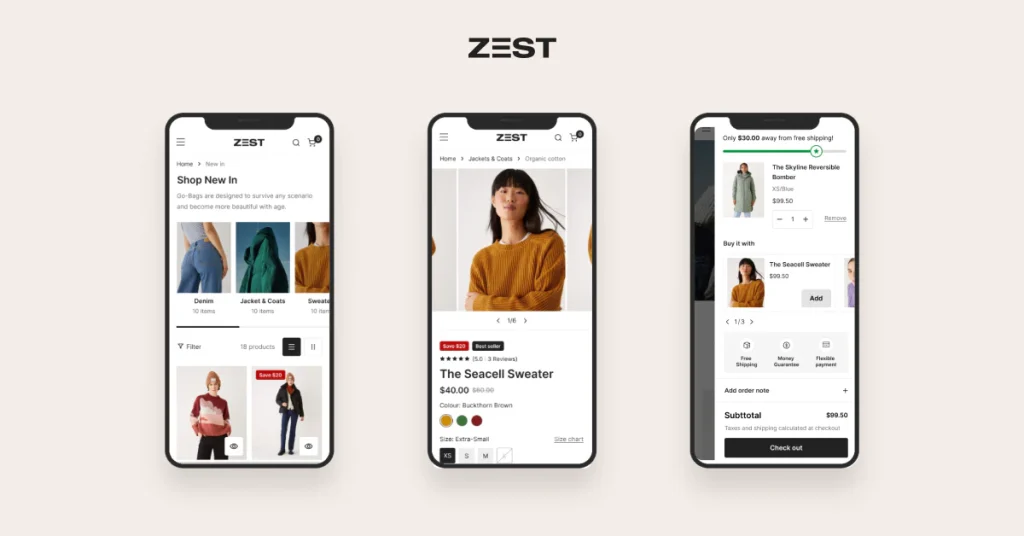
4. Simplify the Checkout Process
A complex checkout process can drive customers away. Offer guest checkout, auto-fill features, and multiple payment options (like PayPal or Google Pay) to make purchasing easy.
5. Use Trust Signals
Showcase secure payment icons, a return policy, and customer testimonials. A trust badge or free shipping message at checkout reassures customers.
6. Add Exit-Intent Popups
Use popups offering discounts or free shipping to capture visitors before they leave. Pair them with email signups to grow your audience.
7. Leverage Analytics
Use Shopify’s built-in analytics or tools like Google Analytics to identify which products perform well and where customers drop off. Refine your strategy based on this data.
By focusing on user experience, transparency, and ease of purchase, your Shopify store can turn visitors into loyal customers. Need help? Reach out to optimize your Shopify store like a pro!